Desktop Application · Case Study
Repo Radar
A clearer view of my local development projects, without opening every folder and checking Git individually.
- Electron
- React
- TypeScript
- Node.js
- Vitest
Personal project · Actively developed
The problem
With development projects spread across local folders, finding where I left off requires repeated context switching. Which repository has uncommitted changes? Which one did I work on recently? Where is the project I want to open?
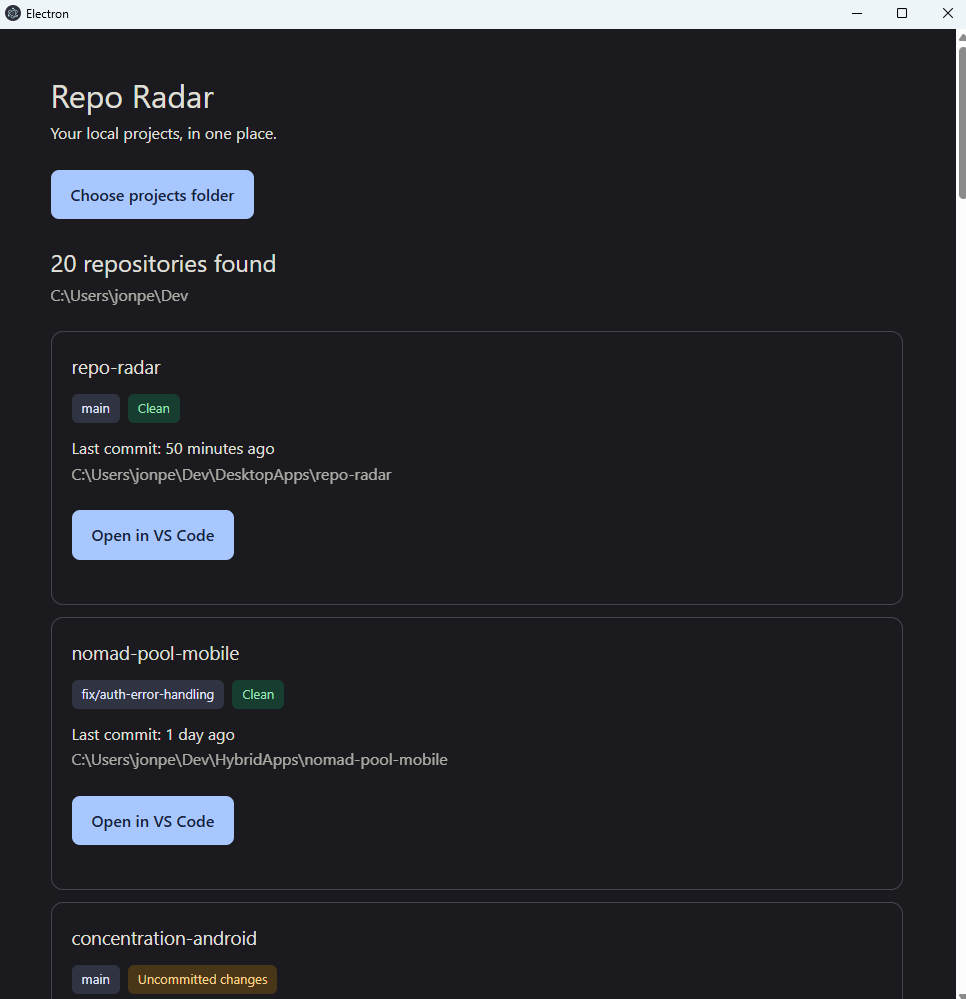
I built Repo Radar to bring those answers into one desktop interface. It inspects local repositories, so a project does not need to be hosted on GitHub to appear.
From folder to working project
01
Choose a folder
Select a projects directory using the native folder picker. Repo Radar searches its nested folders for Git repositories.
02
See where things stand
Review branches, uncommitted changes, and last-commit dates. Repositories with the newest commits appear first.
03
Get back to work
Open a repository in VS Code directly from its card, with loading feedback while the launch request is in progress.
Architecture: separating UI from system access
Electron provides the desktop integration, while React handles the interface. A preload bridge connects the two through specific operations and shared TypeScript types.
- React renderer
- Displays repository cards and manages scan loading, errors, and per-repository launch state.
- Preload bridge
- Exposes methods for choosing and scanning a folder and opening a repository in VS Code through inter-process communication.
- Electron main process
- Owns native dialogs, filesystem traversal, Git subprocesses, and editor launching. Scanning and Git inspection live in separate modules.
This separation lets me test repository discovery without launching the desktop interface. It also introduces an explicit boundary where requests, results, and failures need careful handling.
Engineering decisions and tradeoffs
Keep discovery focused
The scanner skips dependency and generated directories such as node_modules, dist, build, and out. It also stops descending
once it finds a repository. This avoids unnecessary traversal, but
intentionally omits nested repositories and projects inside those
excluded directories.
Preserve useful partial results
An unreadable selected folder fails the scan. An unreadable child folder produces a warning while discovery continues elsewhere. If Git status cannot be retrieved, the repository can still appear with an explanation.
Use predictable Git inspection
Git commands run with separate executable arguments, a timeout, and an output limit. Branch, status, and last-commit queries run concurrently within each repository, while directory traversal remains sequential.
Make recent work easy to find
Results are ordered by last-commit date, with repositories lacking a date placed afterward. When neither repository has a date, sorting falls back to its name. Commit recency is a useful signal, though it does not capture every kind of local activity.
Testing the behavior
Scanner tests use real temporary directories and mocked Git status. This exercises filesystem traversal while keeping branch and commit data predictable. Temporary files are removed after each test.
Current automated coverage
- Recursive discovery and alphabetical fallback ordering.
- Exclusion of common dependency and generated directories.
- Ordering repositories by their most recent commit date.
GitHub Actions currently runs linting and a production build, including TypeScript checks. Adding the Vitest suite to that workflow is a next step. The scanner tests do not yet verify actual Git subprocess behavior or the complete Electron interaction.
Read the scanner tests ↗What I would improve next
- Run behavioral tests in CI alongside linting and type checking.
- Strengthen runtime request validation and the VS Code launch path.
- Expand coverage for scan failures, Git edge cases, and repository boundaries.
- Measure larger scans before introducing bounded concurrency, progress reporting, or cancellation.
What this project taught me
Even a small developer tool needs deliberate decisions about scope, process boundaries, and failure behavior. Repo Radar gave me a practical way to connect interface design with filesystem operations, subprocess handling, and automated tests.
The most useful improvements make the application easier to trust: predictable discovery, understandable warnings, and tests that protect the behavior users depend on.